How to Build a Restaurant Management System That Connects Front and Back of House
Most restaurant software fails not because it lacks features—but because it treats the front of house and back of house as two separate worlds. Orders get lost in translation, inventory never matches what was actually sold, and managers are left stitching together reports from three different tools at midnight. This guide walks through how to architect a system where every price change, allergen update, inventory movement, and labor cost flows through the same underlying records—from the moment a guest orders to the moment the books close.
Start Where Confusion Begins — The Menu Item Record
The single most common failure point in restaurant management systems is treating a menu item as nothing more than a name and a price. In reality, a menu item is a complete operational record that must carry enough structured data to serve both the guest-facing front of house and the cost-conscious back of house simultaneously. When that record is incomplete or inconsistently defined, errors cascade: servers quote wrong prices, kitchen teams use incorrect portion sizes, and food cost reports become unreliable fiction.
Portion & Modifier Definitions
Each item must specify exact portion sizes and all permissible modifiers—"no onion," "extra sauce," "half portion"—so that a front-of-house selection maps directly to a measurable ingredient pull in the kitchen. Without this, recipes drift and waste becomes invisible.
Allergen & Nutritional Data
Allergen flags and nutritional data must live at the item record level, not in a separate document. When a guest asks about gluten, your staff should be able to answer from the same system that routes the order—not a printed binder from three months ago.
Orderable Hours & Availability Windows
Breakfast burgers and dinner-only pasta are real operational constraints. Build availability windows directly into each item record so that POS terminals, QR menus, and online ordering platforms all suppress unavailable items automatically—no manual toggling required.
Front-of-House Price vs. Back-of-House Recipe Cost
The menu item record is the meeting point where the price a guest sees and the ingredient cost the kitchen incurs must resolve to the same item. A price change that doesn't trigger a recipe-cost review creates margin blindspots that compound daily. Your system should enforce this linkage, not leave it to human memory.
Designing your data model around a rich, unified menu item record is the architectural decision that makes everything else possible. For a deeper look at how modern platforms structure this, FineDine Menu's guide on Restaurant Management System scope covers the full range of data relationships you need to account for from the ground up.
A menu item is not a name and a price. It is the single operational record that connects ordering, preparation, costing, compliance, and profitability.
A modern restaurant doesn't receive orders from one place. Guests walk in, scan a QR code, call for delivery, order through a third-party app, or place a takeaway order at the counter. The critical design principle is this: no matter the entry point, all orders must funnel into a single, unified pipeline. The moment you allow parallel order streams that don't talk to each other, you get split inventory updates, inconsistent ticket queues, and customer experience failures that are nearly impossible to diagnose in real time.
POS terminal (counter and tableside)
Table service with handheld devices
QR-code self-order menus
Takeaway and click-and-collect
Delivery platform integrations (first and third-party)
Online ordering portals
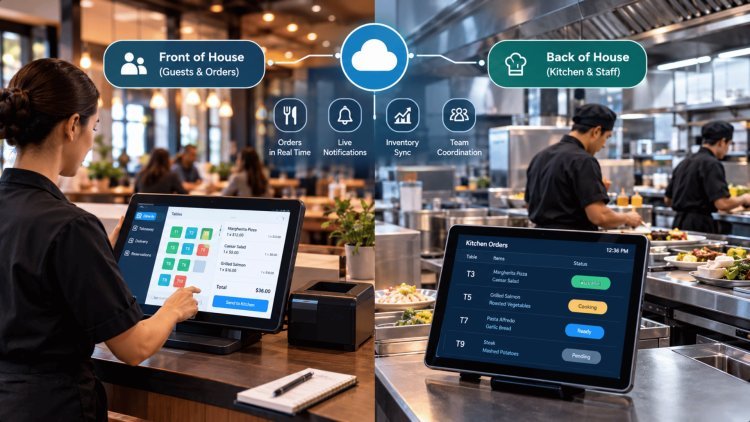
Once an order enters the pipeline, the system must route each line item to the correct kitchen display screen or printer instantly. A grilled salmon goes to the grill station; a dessert soufflé goes to the pastry section. This routing should be configured at the menu item record level—another reason that record must be comprehensive.
No handwritten tickets. Every item should be trackable from ticket creation to table delivery, with timestamps at each stage. This data feeds back into your operational reports as prep time benchmarks and throughput metrics—invaluable for identifying bottlenecks during peak service.
When a menu item sells out or a price is updated, that change must propagate to every connected channel—POS, QR menu, delivery integrations—within seconds. Stale availability data is one of the top causes of guest complaints and kitchen re-fires.
Every order should carry a persistent identifier from entry to fulfillment. Servers can check status, kitchens can prioritize, and managers can audit any breakdown in the flow—without asking anyone to recall what happened from memory.
Kitchen Display Systems (KDS) should show only what's relevant to each station. Overloading a grill cook with dessert tickets creates confusion and delays. Station-level filtering is a configuration, not a workaround—build it into your routing logic from day one.
For a compelling look at how enterprise-grade implementations handle multi-channel order orchestration, Capgemini's Intelligent Restaurant Operations overview outlines the integration architecture that connects every guest touchpoint to a single operational backbone.
Orders Must Flow Through Every Channel Without Forking Truth
Supported Order Channels
Routing Logic to Kitchen Stations
Real-Time Menu Sync
Ticket-to-Table Tracking
Station-Level Clarity
The back of house is where the financial reality of your restaurant is written—and where most systems fall short. A beautifully designed front-of-house experience means nothing if the BOH can’t tell you whether last night’s dinner service was profitable. The goal is a closed loop: every sale deducts from inventory, every shift punches into payroll, and every purchase receipt updates your cost basis—automatically, in real time, without a manager manually reconciling spreadsheets at 2 a.m.
Inventory, labor, and financial performance stay aligned with what was actually sold—without manual reconciliation at 2 a.m.
Back of House Must Reconcile Costs,
Inventory, and Labor to What Was Actually SoldEvery sale, shift, and purchase receipt reconciles automatically.
The final and most important architectural principle is this: your restaurant management system should remain POS-agnostic at the transaction layer while maintaining a completely unified data model beneath it. The objective is not replacing every operational tool at once—it is ensuring that menu records, orders, inventory activity, labor information, and financial transactions all reference the same underlying source of truth.
Front-of-house metrics such as covers, average check value, and table turnover should connect directly with back-of-house operational data including food costs, labor performance, inventory consumption, and waste. When these datasets remain isolated, managers spend time reconciling reports instead of making decisions.
Shared analytics eliminate information silos and enable every stakeholder to work from the same operational reality.
When an item becomes unavailable, every ordering channel should reflect that change immediately. POS terminals, QR menus, delivery platforms, kitchen systems, and online ordering portals must receive synchronized availability updates to prevent overselling and operational disruption.
Rapid item-level synchronization improves guest satisfaction, reduces kitchen re-fire rates, and ensures operational consistency across all customer touchpoints.
The ultimate integration test is simple: can the organization generate an accurate historical profit-and-loss report—including revenue, cost of goods sold, labor expenses, and waste—for any selected date in under sixty seconds?
If the answer is yes, operational systems are connected. If not, critical data remains fragmented across disconnected platforms.
Build your system so that every price change, allergen rule, inventory movement, modifier update, and menu adjustment follows the same underlying record.
When every application reads from and writes to the same data model, reports stop being historical summaries and become operational decision-making tools.
Building this level of integration requires understanding how leading restaurant technology platforms structure operational data flows. Resources such as Kappino's restaurant operations integration framework and Capgemini's Intelligent Restaurant Operations guidance demonstrate how enterprise-grade systems connect order entry, kitchen execution, inventory management, labor tracking, and financial reporting into a unified operational architecture.
Whether evaluating vendors, auditing existing systems, or designing a custom platform, the goal remains consistent: eliminate duplicate records, minimize data reconciliation effort, and ensure every business process operates from a shared source of truth.
The strongest restaurant technology ecosystems are not defined by the number of applications they contain. They are defined by the quality of the relationships between those applications. When menu data, inventory movements, labor activity, financial transactions, and customer interactions operate through a unified data model, every team—from servers and kitchen managers to accountants and executives—can make decisions using the same information, at the same time, with complete confidence in its accuracy. Contact with us for more information.
One Platform, POS-Agnostic, Integrated — Where Front Meets Back in Live Reports
Unified Guest & Operations Data
Fast Sync Across Every Channel
Live Reports From Past Dates
The Guiding Principle
Your Integration Checklist
Further Reading & Resources
One Version of Truth
What's Your Reaction?