Headless CMS Development: Building Flexible Websites for Growing Brands
As digital brands scale across channels, devices, and markets, the architecture powering their content becomes a strategic advantage — or a critical bottleneck. This presentation explores how headless CMS development unlocks flexibility, speed, and long-term maintainability for teams ready to grow without limits.
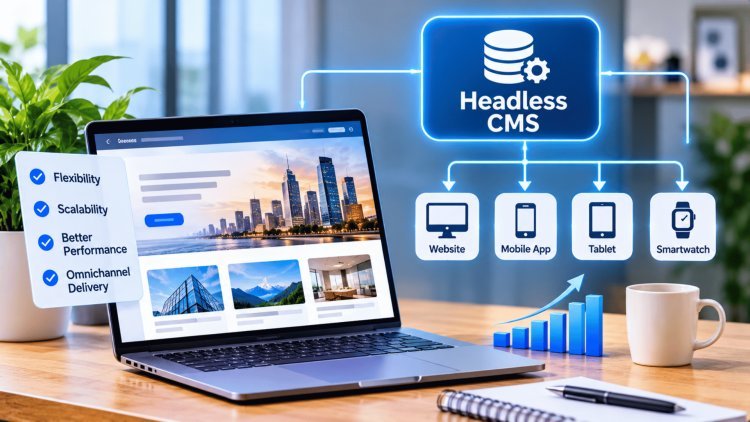
Why "Monolith CMS" Started Breaking Under Growth
For years, traditional content management systems like WordPress, Drupal, and Sitecore served as the backbone of the web. But as brands expanded into mobile apps, digital kiosks, voice interfaces, and third-party integrations, cracks began to show in the monolithic foundation.
The Monolith Problem
Traditional CMSs tightly couple the frontend presentation layer with the backend content management system. Every page template, every piece of markup, and every content field is entangled with how that content gets displayed. This architecture made sense when websites were the only destination — but the modern brand now publishes to a constellation of digital touchpoints simultaneously.
As content velocity rises — think daily blog posts, product updates, regional campaign variations — the monolith becomes a coordination nightmare. Frontend developers can't move without backend changes. Backend changes risk breaking frontend templates. Deployment cycles slow down. Teams duplicate content across systems just to publish to a second channel.
The Headless Shift
Headless CMS decouples the presentation layer from the content management layer entirely. Editors manage content in one place — a clean, structured repository — while that content is delivered via APIs to any frontend: a React website, a mobile app, a digital display, or even a smartwatch interface.
This separation means the content layer is no longer bottlenecked by how it's displayed. The same product description, the same promotional banner, the same editorial article can be served to a dozen different digital experiences from a single source of truth. As omnichannel publishing demands increase, the headless model scales gracefully where the monolith strains.
The core insight: when content and presentation are coupled, every new channel doubles your operational complexity. When they're decoupled, adding a new channel is an API call away.
The philosophical shift behind headless CMS is as important as the technical one. The COPE principle—Create Once, Publish Everywhere—redefines how content teams think about their work. Instead of authoring for a specific page or platform, they author for a content model that can be consumed by any surface.
An API-first headless CMS separates content creation from presentation, giving marketers autonomy and engineering teams independent release velocity.
The Headless Breakthrough:
“Content Once, Publish Everywhere”Create once. Publish everywhere. Develop in parallel.
Selecting a headless CMS platform is only the first decision. The real engineering work lies in designing a cohesive architecture that serves editors, developers, and end-users reliably at scale.
A production-ready headless stack has five distinct layers that must each be deliberately designed.
The foundation of a successful headless implementation is a thoughtfully designed content model — the taxonomy of content types, components, fields, and relationships that editors will work within.
Invest heavily upfront in:
Performance and SEO in a headless architecture are not automatic — they require an intentional rendering strategy. Teams must choose between:
Each strategy has different implications for:
Beyond rendering, none of these come preconfigured in a headless setup the way they might in an opinionated monolith — you implement them:
Every API endpoint exposed by the CMS is a potential attack surface. Production headless systems require:
The best headless stacks include:
Investing in DX reduces bugs at the content-code boundary and accelerates onboarding for new engineers joining the project.
Teams that treat headless as a simple “CMS swap” consistently encounter these problems — all of which could have been designed out from the start:
Building the Flexible System (Not Just Choosing a CMS)
Core Architecture Layers
Content Modeling & Editorial Workflows
Performance, SEO & Rendering Strategy
Security & API Authentication
Developer Experience & Tooling
The measure of a headless CMS implementation isn't how it performs at launch — it's how it holds up as the brand grows, teams multiply, and content volume compounds over years. Migration rigor and governance design are what separate systems that scale gracefully from ones that accumulate invisible debt until they collapse under their own complexity.
A successful migration from a monolithic CMS begins with a comprehensive content audit — cataloging every content type, URL structure, media asset, metadata configuration, and redirect rule in the legacy system. Teams must map legacy content fields to the new headless content model carefully, since structural mismatches at this stage create editorial debt that compounds post-launch. URL preservation is nonnegotiable: every legacy URL that ranks in search engines must either be maintained exactly or redirected with a permanent 301 to its new equivalent, with redirect chains audited to avoid chaining delays. Post-migration testing should cover publishing reliability (can editors create, update, and unpublish content end-to-end?), performance benchmarks against the legacy baseline, and disaster recovery paths — including what happens when the CMS API is temporarily unavailable and how gracefully the frontend degrades.
As brands grow their digital portfolio — adding regional sites, sub-brands, product lines, or white-label properties — the headless architecture must enforce governance boundaries that prevent one team's changes from inadvertently breaking another's experience. This means establishing clear ownership rules for shared content components: global navigation structures, SEO configuration templates, design system tokens, and reusable content blocks must be managed through a controlled change process rather than freely editable by any contributing team.
Practical governance patterns include separate CMS spaces or environments per brand with controlled promotion workflows, shared component libraries with version pinning, and a central platform team that reviews changes to foundational content models before they're deployed to production. Without these guardrails, what begins as an efficient shared architecture gradually becomes a source of production incidents as teams inadvertently overwrite each other's configuration.
The fundamental lesson of headless CMS implementations is that success comes from treating the system as a content delivery architecture — not simply a more modern CMS vendor. Teams that approach headless with the same habits as their monolith (ad-hoc content models, no preview workflows, default rendering settings, no governance processes) will recreate the same pain points they were trying to escape, just with a different tool. Teams that invest in content model design, API security, rendering strategy, editorial preview, migration rigor, and multi-brand governance boundaries build systems that compound in value over time — enabling faster publishing, cleaner code, and confident scaling to new channels and markets without fear of breaking what already works.
The defining question for every headless decision:
Are we designing this for reuse, preview, security, SEO, and long-term maintainability — or are we just swapping the CMS?
The answer determines whether headless becomes a competitive advantage or a more complicated monolith.
Migration, Governance, and the Final Test: Scale Without Breaking
Migration: Mapping, Preserving, and Validating
Multi-Brand Governance: Boundaries That Protect Scale
The Conclusion: Architecture, Not Replacement
What's Your Reaction?