Website Accessibility Audits: Making Digital Experiences Inclusive for Everyone
A structured guide to identifying barriers, meeting legal standards, and building a web that works for every user — regardless of ability or assistive technology.
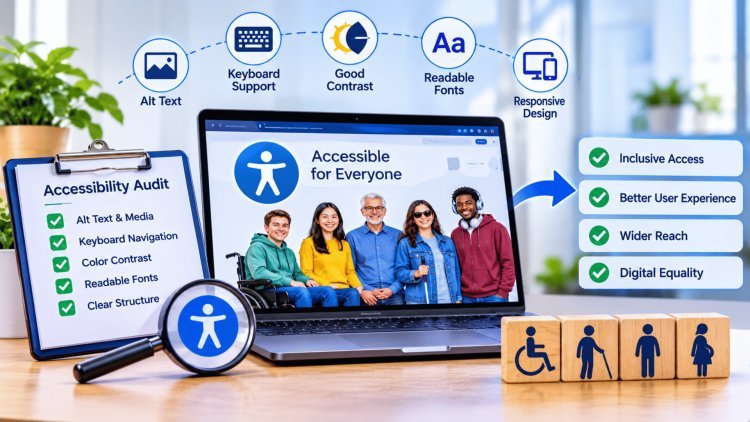
The Stakes: Audits Prevent People from Getting Locked Out
A website accessibility audit is a comprehensive, structured review of a digital experience measured against established standards — most notably the Web Content Accessibility Guidelines (WCAG) and U.S. legal frameworks including the Americans with Disabilities Act (ADA) and Section 508 of the Rehabilitation Act. The goal is to systematically surface barriers that prevent people with disabilities from fully using, navigating, and benefiting from digital content.
Who Benefits from Accessible Design?
Accessibility improvements serve a wide spectrum of users: people with visual, auditory, motor, or cognitive disabilities; older adults experiencing age-related changes; users on low-bandwidth connections; and anyone relying on assistive technologies like screen readers, switch controls, or voice input software.
Globally, over 1 billion people live with some form of disability — representing a significant portion of your potential audience. Locking them out isn't just inequitable; it's a missed opportunity.
Legal and Business Risk Reduction
Beyond the moral imperative, accessibility audits carry tangible legal weight. ADA-related web accessibility lawsuits have risen sharply year over year, with thousands of cases filed annually in U.S. federal courts. Organizations that conduct regular audits and remediate findings proactively are far better positioned to demonstrate good-faith compliance — reducing exposure to litigation, regulatory scrutiny, and reputational damage.
Audits create a documented record of your accessibility posture, showing stakeholders, legal counsel, and regulators that your organization takes inclusive design seriously and acts on findings with measurable timelines.
When to Audit
Before a major product launch or redesign
After significant feature additions or platform migrations
On a recurring schedule (quarterly or annually at minimum)
In response to user complaints or legal inquiries
WCAG 2.x is organized around four foundational principles—often called POUR—that together define what it means for a digital experience to be truly accessible. Every success criterion in the guidelines maps back to one of these four lenses. Understanding them is essential for scoping and conducting a meaningful audit.
POUR ensures that content can be perceived, interfaces can be operated, experiences can be understood, and technology remains robust across current and future assistive tools.
What You Audit: Four Lenses
That Reveal Real BarriersAudit through all four lenses to reveal real barriers.
A rigorous accessibility audit combines the speed of automated scanning with the irreplaceable judgment of manual testing. Neither approach alone is sufficient — automated tools catch known code-level patterns quickly, while human testers validate real-world usability and contextual severity that no algorithm can fully assess.
Tools like Axe, WAVE, and Google Lighthouse can scan hundreds of pages rapidly, surfacing common issues such as missing form labels, insufficient color contrast, absent alt text, and invalid ARIA usage. These tools are invaluable for establishing a baseline and catching regressions in CI/CD pipelines.
Manual auditing evaluates the site the way real users experience it. Key techniques include keyboard-only navigation, screen reader testing (NVDA, JAWS, VoiceOver), zoom/reflow checks at 200–400%, and cognitive/plain-language review of instructions and error messages.
Heading hierarchy, semantic HTML, descriptive link text (not “click here”), and meaningful page landmarks that allow screen reader users to navigate efficiently.
All images require descriptive alt text; videos need synchronized captions and audio descriptions; audio content requires transcripts. Decorative images should be marked to be ignored.
Every input must have a programmatically associated label. Error messages must identify the field, describe the problem, and suggest a correction — never relying on color alone.
Custom widgets (modals, dropdowns, carousels, tabs) must follow ARIA authoring patterns, support full keyboard interaction, and announce state changes to screen readers in real time.
Automated tools excel at finding known patterns at scale, but only human judgment can confirm real-world severity and usability. A complete accessibility audit requires both: rapid pattern detection followed by expert validation of impact. Tools surface the issues — humans determine what truly matters to users.
How Audits Are Done: Tools Find Patterns, Humans Confirm Severity
Automated Testing Tools
Manual Testing Methods
Core Areas of Audit Coverage
Text Structure & Links
Media Alternatives
Forms & Error Handling
Interactive Components
Key Audit Principle
An accessibility audit only creates value when findings are translated into measurable improvements. The most successful organizations use accessibility as a continuous improvement process, moving systematically from issue identification to remediation, validation, and long-term governance. Accessibility maturity is achieved through repetition, accountability, and ongoing commitment to inclusive experiences.
Every accessibility issue should be linked to its corresponding WCAG success criterion and assigned a severity classification. Critical issues that prevent users from completing core tasks should be addressed first, while lower-severity findings can be incorporated into broader improvement initiatives.
Accessibility improvements should be integrated into development roadmaps, sprint plans, and release schedules. Effective remediation requires coordination across engineering, design, content, and product teams.
Once fixes are deployed, all remediated issues should be tested again using the same methodology employed during the original audit. Validation confirms that barriers have been removed without introducing new accessibility defects.
Accessibility should become part of normal delivery processes rather than a standalone initiative. Automated testing, recurring audits, developer education, and design-system governance help prevent future issues from reaching production.
Organizations that achieve lasting accessibility excellence do not view audits as compliance exercises. They use audit findings as inputs to a continuous improvement system that strengthens products, improves user experiences, and builds organizational capability over time. Accessibility becomes sustainable when teams consistently follow the cycle of identifying barriers, implementing fixes, validating results, and embedding inclusive practices into everyday design and development workflows. For more details contact with us.
Turn Findings into Inclusive Outcomes — Then Repeat
Document & Prioritize
Remediate with Timelines
Re-Test & Validate
Make It Iterative
Accessibility Improvement Lifecycle
Long-Term Accessibility Success Factors
Final Takeaway
What's Your Reaction?