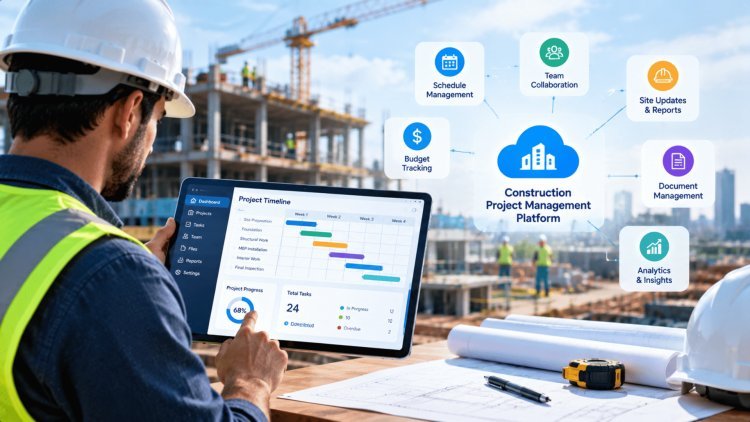
How to Build a Construction Project Management Platform for Contractors
Menus, Options, and Full Workflow Coverage — A practical blueprint for designing software that contractors actually use, from preconstruction through project handover.
Start With the Truth: What Contractors Actually Do Every Day
Most construction teams are still juggling spreadsheets, email chains, and disconnected apps — losing hours every week to version conflicts, missed updates, and siloed data. A purpose-built construction project management platform must unify every function that matters to a contractor: project setup, scheduling, budgets, subcontractor coordination, document control, and real-time field updates. The goal is to eliminate the "information lag" between the office and the job site so that every decision is grounded in current data.
The foundation of great platform design is a navigation structure that mirrors how contractors actually think and work. Rather than organizing menus around software modules, organize them around the lifecycle a construction team lives in every single day:
Setup
Project creation, team roles, client info
Planning
Schedules, milestones, task assignments
Budgeting
Cost codes, estimates, forecasts
Construction
Field logs, photos, inspections
Handover
Punch lists, closeout docs, sign-off
When your top-level navigation reflects this lifecycle — Setup → Planning → Budgeting → Procurement → Construction → Inspection → Handover — new users immediately understand where to go without training. This reduces onboarding friction dramatically and drives adoption across both office staff and field crews.
According to platform architecture best practices outlined in resources like the Construction Management Software Architecture guide, lifecycle-first navigation is the single most impactful structural decision you can make early in development.
The best construction platforms don't teach contractors new workflows — they mirror the workflows contractors already follow, then make them faster and more connected.
Organize software around the construction lifecycle, not software modules. Adoption follows naturally when the platform mirrors real-world contractor workflows.
Once you've established the lifecycle as your navigation spine, the next step is mapping specific menus and sub-options to the two major operational phases every contractor navigates: Preconstruction and Field Operations. These phases have distinct user personas, distinct data needs, and distinct urgency levels — your platform's menu architecture must serve both without forcing either group to wade through irrelevant screens.
The preconstruction phase is where projects are won or lost financially. Menus here should prioritize speed and accuracy for estimators, project managers, and business development teams.
Estimating — quantity takeoffs, labor rates, material cost libraries
Bidding — bid package creation, subcontractor invitations, bid leveling
Prequalification — vendor scoring, insurance tracking, compliance docs
Permitting — permit log, submission status, jurisdiction tracking
Once boots hit the ground, the platform must shift to real-time field data. Office teams and field crews must pull from the same source of truth — no more "which version is current?" conversations.
Scheduling — Gantt views, look-ahead schedules, resource leveling
Workforce Management — crew assignments, certifications, labor hours
Equipment — utilization tracking, maintenance logs, dispatch
Inventory — material receipts, on-site stock, wastage tracking
A critical design requirement — often overlooked by developers building from an office-centric perspective — is that field users have a fundamentally different relationship with technology. They're working in bright sunlight, wearing gloves, moving quickly, and frequently in areas with poor connectivity. Your "field-first" menu options must be engineered for these realities.
One-tap daily log creation with weather capture, crew count, and activity notes. Autotimestamped and linked to the project record.
Geotagged photo capture linked directly to tasks, RFIs, or punch list items. No manual filing required — the platform does it automatically.
Field-optimized time cards with crew-level entry, cost code tagging, and supervisor approval workflows — all from a mobile device.
Configurable inspection checklists with pass/fail flags, photo evidence, and automatic notification routing to the responsible party.
All field actions queue locally when connectivity drops and sync automatically when the device reconnects — critical for remote job sites.
Map Menus to Modules: Preconstruction to Field Operations
Preconstruction Navigation
Operations & Field Navigation
Field-First Options: Designed for the Job Site
Daily Logs
Photo Documentation
Time Entry
Inspections
Offline Capture
For platforms serving general contractors, specialty subcontractors, and owner-operators simultaneously, architecture decisions made at the product level become business-critical. The two most impactful structural choices are the Contractor Portal and the multi-tenant workspace model. Together, they allow your platform to scale across hundreds of contractors without requiring a separate deployment for each.
A contractor portal and multi-tenant workspace model let every organization experience the platform as its own—while your team maintains a single, scalable codebase.
Contractor Portal + Multi-Tenant
WorkspacesOne system. Many contractors. Zero separate deployments.
Even the most thoughtfully designed platform fails if it's launched all at once with too many features and not enough user feedback. The most successful construction technology deployments follow a disciplined MVP-first strategy: start narrow, prove value quickly, gather real-world feedback, and expand only after the foundation is proven in active project environments.
The MVP should focus exclusively on the highest-frequency, highest-friction field activities. Time entry, daily reporting, and photo capture establish immediate value while generating real usage data. These workflows create adoption habits and expose usability issues before investment is made in more advanced modules.
Run a structured pilot with two to three contractor teams, monitor adoption weekly, and document every user obstacle. Early-stage depth delivers more value than broad feature coverage.
Once field adoption exceeds 80% and the core usage loop is stable, additional operational modules can be introduced. Inspection processes, equipment tracking, and offline synchronization become far more effective when daily reporting behaviors are already established.
Equipment utilization metrics gain context through daily activities, while inspection findings become more actionable when linked directly to responsible crews and documented field work.
The integration layer transforms a field productivity application into a business intelligence platform. Accounting systems, ERP solutions, and contractor-facing portals create direct operational visibility between jobsite data and business performance.
Real-time job costing, payroll synchronization, and project financial tracking provide actionable insight while projects are active rather than weeks after costs have already accumulated.
Connect QuickBooks, Sage, Viewpoint, SAP, and related systems for real-time cost visibility and payroll synchronization.
Provide drawing and model access directly within project workflows to support coordination and field decision-making.
Align operational activities with financial structures for accurate forecasting and reporting.
Deliver alerts directly through Teams, Slack, and existing communication environments.
"Organize every menu option around who needs this, when, and why — so that onboarding feels effortless and adoption becomes inevitable."
Every menu label, every workflow, and every default screen should answer three questions: Which user role needs this? At what phase of the project? To make which decision? When those answers are clear, the platform becomes intuitive, reducing training requirements and increasing adoption across all stakeholder groups.
Structure navigation around Setup, Planning, Budgeting, Construction, and Handover rather than software-centric module names.
Prioritize offline capability, photo-centric workflows, and one-tap interactions. If a workflow requires a desk, field adoption will suffer.
Connect accounting and ERP systems before broad rollout to provide immediate project cost visibility and stronger business justification.
Launch with time entry, daily reports, and photos. Expand functionality only after pilot adoption demonstrates sustained operational value.
Build, Integrate, Roll Out: The Practical Route to Launch
Phase 1: MVP
Phase 2: Expansion
Phase 3: Full Platform
High-Value Integration Priorities
The Design Principle That Ties Everything Together
Lifecycle Navigation
Field-First Design
Integrate Early
MVP Then Scale
What's Your Reaction?