Deep Linking in Mobile Apps: Connecting Users Directly to the Right Content
In a world where every extra tap costs you a user, deep linking is the architecture that eliminates friction entirely. Rather than dumping users on a generic homepage and hoping they find their way, deep links act as precision-guided coordinates — routing anyone who taps a link straight to the exact screen, product, article, or action they were promised. This presentation breaks down how deep linking works, the technical flavors available on Android and iOS, the magic of deferred and contextual flows, and the practical checklist every mobile team needs to get it right.
The Core Promise: Bypass the App Homepage
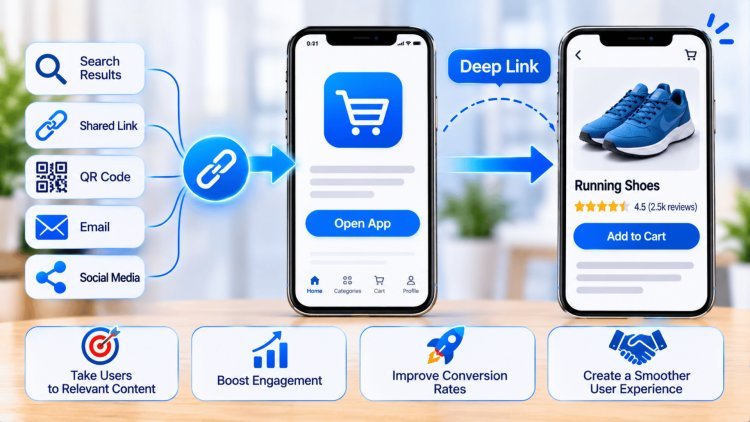
The fundamental value proposition of deep linking is deceptively simple: when a user taps a link — whether from an email, a push notification, a social post, or a web banner — they should land on the exact piece of content that was advertised, not the app's default homepage. This seemingly small distinction has enormous consequences for user experience, conversion rates, and retention.
What Deep Links Actually Do
A deep link is not merely an instruction to "open the app." It is a full routing directive that carries a destination address and, optionally, a set of parameters that trigger automatic actions upon launch.
When executed correctly, the app receives the link payload, resolves the target screen, performs any necessary authentication or state setup, and renders the destination with proper orientation transitions — so the user always knows where they are in the navigation hierarchy and can navigate back naturally.
Why the Homepage Default Fails
When links open only the app's root screen, users must retrace the journey themselves — searching for the product they already found, re-entering a promo code, or hunting for the article they were reading.
Research consistently shows that each additional step between intent and content increases abandonment. Deep links collapse that gap to zero, making the transition from advertisement or notification to meaningful engagement nearly instantaneous.
The goal: launch → receive link → display exact content, with contextual navigation so users always know where they are.
Specific Screen Routing
Navigate users directly to any product page, article, profile, or in-app feature — skipping every intermediate screen.
Automatic Action Execution
Deep links can carry parameters that trigger actions on arrival — pre-filling a form, applying a coupon, or starting a video at a timestamp.
Proper Back-Stack Construction
Well-implemented deep links build the correct navigation back-stack so the back button behaves intuitively, preserving the user's sense of place.
Why Deep Linking Matters
Every additional tap, search, scroll, or navigation step creates friction. Deep linking removes that friction by preserving the user's original intent from the moment they interact with a campaign, notification, message, or shared link.
By eliminating unnecessary navigation, organizations improve user engagement, increase conversion rates, accelerate task completion, and create a more seamless cross-channel experience.
Deep linking succeeds when users never need to think about navigation. Their intent is understood, their destination is reached immediately, and the transition from discovery to engagement feels seamless and effortless.
The promise of deep linking is simple but powerful: users should never be forced to rediscover what they already requested. The shortest path between intent and value is the one that wins engagement, conversion, and long-term retention.
Android and iOS each have their own deep linking ecosystems, and understanding the difference between older custom-scheme approaches and modern verified links is critical to building a seamless, trustworthy experience. Choosing the wrong type can expose users to disambiguation dialogs, broken fallbacks, or even security vulnerabilities.
The original Android approach uses a custom URI scheme like myapp://product/42. These are easy to implement and require no server-side verification, but they come with significant drawbacks. Because any app can register any custom scheme, they are vulnerable to URI scheme hijacking by malicious apps. More importantly, if multiple apps register the same scheme, Android presents a disambiguation dialog — a jarring interruption that breaks the seamless tap-to-content experience and confuses users who don't understand why they're being asked to choose.
Web links use standard HTTP or HTTPS URLs and can open in either a browser or an app. While they benefit from the universality of the web URL format, unverified web links still trigger the disambiguation dialog on Android, asking the user whether to open in a browser or in a specific app. This is an improvement in security over custom schemes but still falls short of the seamless experience that modern deep linking demands. They are best used as a stepping stone toward full App Links verification.
App Links represent Android's gold standard. By hosting a Digital Asset Links JSON file at /.well-known/assetlinks.json on your domain and declaring the association in your app manifest, Google verifies ownership. Verified App Links open directly in your app — no dialog, no friction. If the app isn't installed, the link falls back gracefully to the web browser, preserving the user journey. This is the approach Google strongly recommends for all production apps that need reliable, trustworthy deep linking at scale.
Apple's equivalent is Universal Links, implemented by hosting an Apple App Site Association (AASA) file at /.well-known/apple-appsite-association on your domain. This file specifies which URL paths should open in which app, and Apple's CDN fetches and caches it during app installation to validate the association. Universal Links open the app directly when installed, with no disambiguation prompt. Crucially, if the app is not installed, the URL falls back to Safari, allowing users to view the equivalent web content — an elegant fail-safe that never leaves the user stranded. Custom URL schemes (myapp://) are still supported on iOS but should be treated as a legacy fallback only.
The Two Worlds: Custom Schemes vs. Verified Links
Android
Android: Custom Deep Links (Custom URI Scheme)
Android: Web Links (HTTP/HTTPS)
Android: App Links (Verified, Domain-Associated)
iOS: Universal Links (HTTP/HTTPS via AASA)
Standard deep links work beautifully when the app is already installed. But what happens when a potential user taps a link and doesn’t have the app yet? Or when you need to carry marketing attribution data all the way from the first click through to a purchase weeks later? That’s where deferred and contextual deep linking transform the funnel.
Deferred deep linking restores the promised destination after installation; contextual deep linking carries campaign, creative, and attribution context all the way to the first meaningful in-app action.
When the User Isn’t Ready: Deferred
and Contextual Deep LinkingPreserve the user’s intent through the install gap.
Deep linking succeeds when users arrive exactly where they expect, without friction, confusion, or technical interruptions. Production-grade implementations require verified link infrastructure, thoughtful navigation design, search alignment, and continuous monitoring. Together, these elements transform deep links from simple routing mechanisms into powerful drivers of acquisition, engagement, and retention.
Android App Links and iOS Universal Links provide the most reliable deep-link experience by eliminating application-selection prompts and reducing security risks associated with URI-scheme hijacking.
A deep link should feel natural and predictable. Users should arrive at the intended content with an intuitive navigation hierarchy that supports logical back-button behavior and preserves context.
Consistency between app content and corresponding web experiences is essential for discoverability, trust, and indexing effectiveness. Content delivered through deep links should accurately reflect the associated web destination.
Deep-link infrastructure requires continuous monitoring because failures often occur silently. Analytics visibility and validation procedures ensure issues are detected before they affect acquisition and conversion performance.
Confirm successful App Links and Universal Links verification.
Validate destination routing and back-stack behavior across user journeys.
Ensure parity between app experiences and associated web destinations.
Track destination-level engagement, retention, and conversion performance.
Every deep link should feel like teleportation. A user taps, arrives instantly at the intended destination, finds exactly the content expected, and navigates naturally without confusion or interruption. The best deep-link implementations are practically invisible because they remove friction completely. When verified infrastructure, navigation design, content alignment, and continuous measurement work together, deep linking becomes a powerful engine for acquisition, engagement, retention, and long-term product growth.
Build It Right: The Practical Checklist for "Right Content"
Use Verified Links by Default
Design for Navigation Expectations
Align App & Web Content
Instrument & Validate Continuously
Ideal Deep Link Journey
Production Readiness Checklist
The North Star
What's Your Reaction?